The developers on the project I worked on wanted to showcase their work on a dedicated branch and automatically roll it out and make it available via a CI/CD pipeline. Simply said, if a developer creates a new branch with the prefix “feature/,” this branch should be accessible via https://<branch-name>.feature.yourdomain.ch in an automated way.
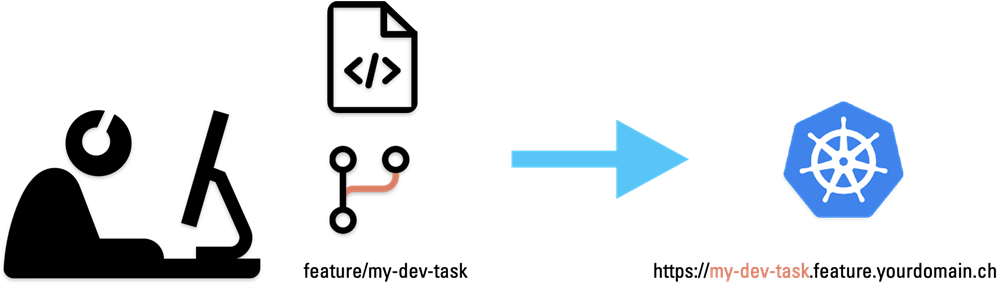
Simplified overview
In this article, we will take a closer look at one such automated environment.
There are three basic decisions that have been taken into account for this approach:
- Development is done according to the principles of GitOps and GitFlow.
- CI and CD are two separate pipelines, CD is done with ArgoCD.
- Passwords/secrets are encrypted with bitnami-sealed secrets.
GitOps and GitFlow
Simply put, the “truth” is always inside the Git repository, and each environment has its own branch, such as dev, test, int, and prod.
Separation of CI and CD
CI and CD were separated on purpose, first to optimize the pipeline itself, as running a CI pipeline if, for example, only a Kubernetes definition has been modified makes little sense. Second, there was a need to improve access control over who may make modifications to Kubernetes definitions.
Sealed secrets
Because everything after GitOps is saved in Git, we need a simple solution to encrypt sensitive data so that it can be stored in Git.
Setup prerequisites
This proof-of-concept automated environment is based on:
- 2 Git repositories (CI and CD)
- 2 pipelines (we use GitLab CI/CD)
- k8s cluster (we use a rancher cluster)
- 2 DNS entries (1 wildcard)
- 1 Docker registry (we use Harbor)
- Installed argocd operator on the k8s cluster
- Installed bitnami sealed secret operator on the k8s cluster
Communication
Tokens are used for all communication between repositories (API), the Kubernetes cluster, and the Docker registry. This article does not explain how to configure them; if you need help, refer to the following resources:
https://docs.gitlab.com/ee/security/token_overview.html
https://goharbor.io/docs/2.7.0/working-with-projects/project-configuration/create-robot-accounts/
https://kubernetes.io/docs/reference/access-authn-authz/authentication/
Variables
The pipelines and scripts in this example code are using GitLab CI/CD variables for customization. There are some exceptions where we cannot use variable substitution within bash scripts; in these cases, you must change the values within the script.
CI pipeline
| Variable | Description |
|---|---|
| GIT_URL | Git server url |
| GIT_DEPLOY_REPO | Name of the CD repository |
| GIT_USER | something (it doesn’t matter), the token matters |
| GIT_TOKEN | Git token |
| GIT_PROJECT_URL | CD repository url |
| REGISTRY_URL | Docker registry url |
| REGISTRY_TOKEN | Registry token |
| REGISTRY_USER | Registry user |
| REGISTRY_PROJECT | Harbor registry project |
CD Pipeline
| Variable | Description |
|---|---|
| RANCHER_CONTEXT | Cluster context of the rancher environment |
| RANCHER_TOKEN | Access token to the rancher cluster |
| RANCHER_URL | Management url of the rancher cluster |
Overall pipeline overview
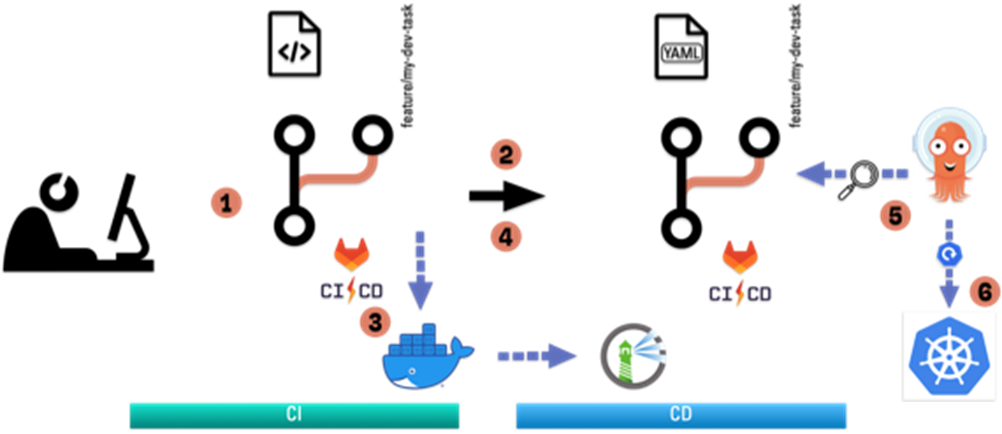
Overall pipeline overview
- The developer creates a new feature branch named “feature/my-dev-task”.
- Once pushed to the Git src branch, a twin branch with the same name is created in the CD repository.
- The CI pipeline builds the artifact, creates a Docker image, and loads it into the Docker registry.
- After the image has been successfully built and uploaded, the corresponding image tag is updated in the CD twin branch.
- ArgoCD registers the change in the Git branch
- and applies those changes to the Kubernetes cluster.
Content of the CI repository
The CI repository consists of the application and all instructions on how to build it and package it into a Docker image. In our example, a static website is generated from a simple NUXT3 application (app.vue), which is then packed into a Docker nginx image.
├── Dockerfile
├── README.md
├── app
│   ├── app.vue
│   ├── assets
│   │   └── img
│   │       └── remmen.png
│   ├── nuxt.config.ts
│   ├── package.json
│   ├── tsconfig.json
│   └── yarn.lock
├── nginx
│   └── nginx.conf
└── pipeline_process.png
File structure of the CI repository
Dockerfile
The Dockerfile itself is very minimalistic. It simply copies the static output of the “yarn generate” into an nginx container and adds the needed configuration/setup to run it.
FROM nginx:stable-alpine
LABEL maintainer="[email protected]"
LABEL app="feature-branch-demo"

COPY app/.output/public /usr/share/nginx/html
COPY nginx/nginx.conf /etc/nginx/nginx.conf

## add permissions for nginx user
RUN chown -R nginx:nginx /usr/share/nginx/html && chmod -R 755 /usr/share/nginx/html && \
        chown -R nginx:nginx /var/cache/nginx && \
        chown -R nginx:nginx /var/log/nginx && \
        chown -R nginx:nginx /etc/nginx/conf.d
RUN touch /var/run/nginx.pid && \
        chown -R nginx:nginx /var/run/nginx.pid

USER nginx
Dockerfile
nginx configuration
The nginx configuration is also very minimalistic, the import part is to add a “.” as a prefix to the server_name to match both the exact name “your.domain.ch” and the wildcard name “*.your.domain.ch”.
server {
        listen 80;
        server_name .your.domain.ch;
	   …
	}
Extract of the nginx.conf
Content of the CD repository
The CD repository consists of the argocd application as well as all the Kubernetes resources based on a classic kustomize structure with a base configuration and overlays for each environment.
├── README.md
├── argocd
│   ├── feature
│   │   └── demo-app-feature.yml
│   └── main
│       └── demo-app.yml
└── kustomize
    ├── base
    │   ├── deployment.yml
    │   ├── kustomization.yml
    │   └── service.yml
    └── overlay
        ├── feature
        │   ├── basic-auth-sealed.yml
        │   ├── ingress.yml
        │   └── kustomization.yml
        └── main
            ├── basic-auth-sealed.yml
            ├── ingress.yml
            └── kustomization.yml
File structure of the CD repository
Feature-branch adjustments
Once a new feature branch is created, some adjustments are made automatically:
- setting the name and env within the argocd application definition
- setting the nameSuffix and env within the kustomize definition
- setting the host/hosts within the ingress definition2
STAY TUNED
Learn more about DevOpsCon
This is done by replacing the placeholder text “BRANCH_ID_TO_REPLACE” with the branch name of the CI branch in lowercase.
“Protecting” your feature applications
Usually, you don’t want to expose “work-in-progress” to the internet. Therefore, we added a simple htaccess protection to the ingress named basic-auth.
annotations:
    kubernetes.io/tls-acme: "true"
    # authentication
    nginx.ingress.kubernetes.io/auth-type: basic
    nginx.ingress.kubernetes.io/auth-secret: basic-auth
    nginx.ingress.kubernetes.io/auth-realm: 'Authentication Required’
Extract of the ingress definition
This has the added benefit of preventing search bots from indexing the website.
Let’s have a detailed look at the whole pipeline
The CI pipeline does the majority of the work; the CD pipeline just builds the argocd application, which is then in charge of rolling out the application to the Kubernetes cluster.
CI sequence
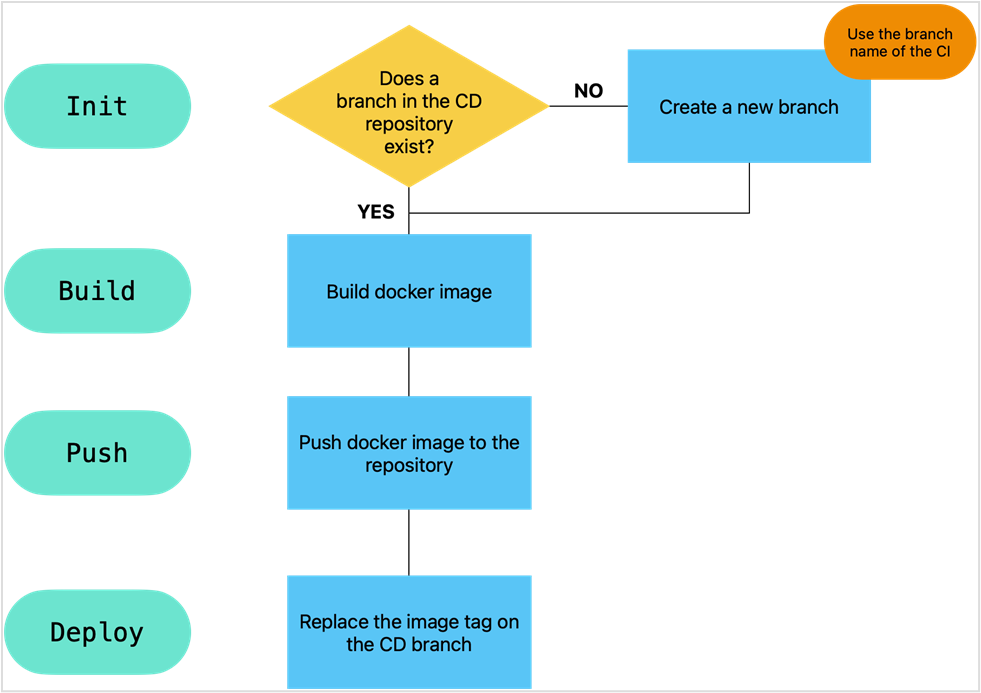
CI sequence
Because the build and push stages are so common, let’s take a deeper look at the pipeline’s most important stages.
Init
In the initialization step, the CI branch will first check if there is already a twin branch, and if not, it will create one in the CD repository.
setup_dotenv:
  stage: init
  tags:
    - shell
  script:
    - |
      if [[ "${CI_BUILD_REF_NAME}" =~ ^feature\/.+ ]]; then
        export FEATURE_PREFIX="${CI_BUILD_REF_NAME##feature/}"
        FEATURE_PREFIX_LOW="$(echo $FEATURE_PREFIX | tr '[A-Z]' '[a-z]')"
      fi
      export BRANCH_NAME=${CI_BUILD_REF_NAME%%/*}
      echo "FEATURE_PREFIX_LOW=$FEATURE_PREFIX_LOW" >> variables.env
      echo "BRANCH_NAME=$BRANCH_NAME" >> variables.env
  artifacts:
    reports:
      dotenv: variables.env
    expire_in: 1 h

setup_argo-cd:
  needs:
    - setup_dotenv
  stage: init
  rules:
    - if: $CI_BUILD_REF_NAME =~ /feature/
      when: always
    - when: never
  tags:
    - shell
  script:
    - |
      projectID=`curl -s --header "Authorization: Bearer $GIT_TOKEN" "https://your.gitlabserver.ch/api/v4/projects" | jq '.[] | select(.path=="auto-feature-branch-deploy") | .id'`
      response=`curl -s --header "Authorization: Bearer $GIT_TOKEN" "https://your.gitlabserver.ch/api/v4/projects/${projectID}/repository/branches" |grep -c ${FEATURE_PREFIX_LOW} || true`

      if [ "$response" == "0" ]
        then
            echo Branch ${FEATURE_PREFIX_LOW} seems not to exist, creating...
            git clone https://${GIT_USER}:${GIT_TOKEN}@${GIT_PROJECT_URL} --quiet
            success=$?
            if [[ $success -eq 0 ]];
            then
                echo "Repository successfully cloned."
                cd ${GIT_DEPLOY_REPO}
                git checkout -b feature/${FEATURE_PREFIX_LOW}  --quiet
                echo  Branch created >> README.md

                #Adjustments
                cd argocd/feature
                sed -i'' -e 's;BRANCH_ID_TO_REPLACE;'"${FEATURE_PREFIX_LOW}"';g' demo-app-feature.yml
                cd ../../kustomize/overlay/feature
                sed -i'' -e 's;BRANCH_ID_TO_REPLACE;'"${FEATURE_PREFIX_LOW}"';g' kustomization.yml
                sed -i'' -e 's;BRANCH_ID_TO_REPLACE;'"${FEATURE_PREFIX_LOW}"';g' ingress.yml

                git commit -a -m 'auto-create branch' --quiet
                git push --quiet -u --no-progress origin feature/${FEATURE_PREFIX_LOW}
                success=$?
                if [[ $success -eq 0 ]];
                then
                    echo "Branch successfully commited."
                else
                    echo "Something went wrong during the commit!"
                fi
                #Cleanup
                cd ../../../../
                rm -rf ${GIT_DEPLOY_REPO}
            else
                echo "Something went wrong during clone!"
            fi
        else
            echo  Branch ${FEATURE_PREFIX_LOW}  already exists.
        fi
Init stage of the CI pipeline
To comply with DNS, we convert the branch name to lowercase with bash. Please be aware that non-DNS conforming characters are not allowed (though this has not been explicitly tested).
if [[ "${CI_BUILD_REF_NAME}" =~ ^feature\/.+ ]]; then
        export FEATURE_PREFIX="${CI_BUILD_REF_NAME##feature/}"
        FEATURE_PREFIX_LOW="$(echo $FEATURE_PREFIX | tr '[A-Z]' '[a-z]')"
      fi
Simple bash method to convert the name to lowercase
This information is then passed on to the next stage as a dotenv variable.
In the second step, the initialization job checks if a CD branch with the same name already exists. This can be done through the GitLab API after extracting the projectID.
projectID=`curl -s --header "Authorization: Bearer $GIT_TOKEN" "https://your.gitlabserver.ch/api/v4/projects" | jq '.[] | select(.path=="auto-feature-branch-deploy") | .id'`
      response=`curl -s --header "Authorization: Bearer $GIT_TOKEN" "https://your.gitlabserver.ch/api/v4/projects/${projectID}/repository/branches" |grep -c ${FEATURE_PREFIX_LOW} || true`
Initialization retrieves the projectID and counts the number of branch occurrences

Kubernetes Training (German only)
Entdecke die Kubernetes Trainings für Einsteiger und Fortgeschrittene mit DevOps-Profi Erkan Yanar
Deploy
Typically, the application is installed directly on a Kubernetes cluster during the deployment. In our case, instead, we check out the corresponding CD twin branch, modify the image name with the new build, and then commit the change.
As with kustomize best practices, we have a dedicated overlay folder for each environment, therefore the location of the kustomize file must be adjusted. In our proof of concept code, we simply have a dedicated deploy job pointing to the correct location.
This is accomplished by adding the required tools (Git and kustomize) to an alpine container, which is used to do the git actions as well as set the new image label with kustomize’s “edit set image” method.
app_deploy_feature:
  needs:
    - app_push
    - setup_dotenv
  stage: deploy
  rules:
    - if: $CI_BUILD_REF_NAME =~ /feature/
    - when: never

  environment:
    name: $CI_BUILD_REF_NAME
    on_stop: feature_stop

  image: alpine
  tags:
    - docker
  before_script:
    - apk add --no-cache git curl bash
    - curl -s "https://raw.githubusercontent.com/kubernetes-sigs/kustomize/master/hack/install_kustomize.sh"  | bash
    - mv kustomize /usr/local/bin/
    - git remote set-url origin https://${GIT_USER}:${GIT_TOKEN}@${GIT_PROJECT_URL}
    - git config --global user.email "argocd-ci@${GIT_URL}"
    - git config --global user.name "GitLab CI/CD"
  script:
    - git clone -b feature/${FEATURE_PREFIX_LOW} https://${GIT_USER}:${GIT_TOKEN}@${GIT_PROJECT_URL}
    - cd ${GIT_DEPLOY_REPO}/kustomize/overlay/feature
    - kustomize edit set image DUMMY_IMAGE=$REGISTRY_URL/${REGISTRY_PROJECT}/feature-branch-app:${BRANCH_NAME}_${CI_PIPELINE_ID}
    - git commit -am "Updated Image - ${CI_COMMIT_TITLE} "
    - git push
App deploy for a feature branch
CD sequence
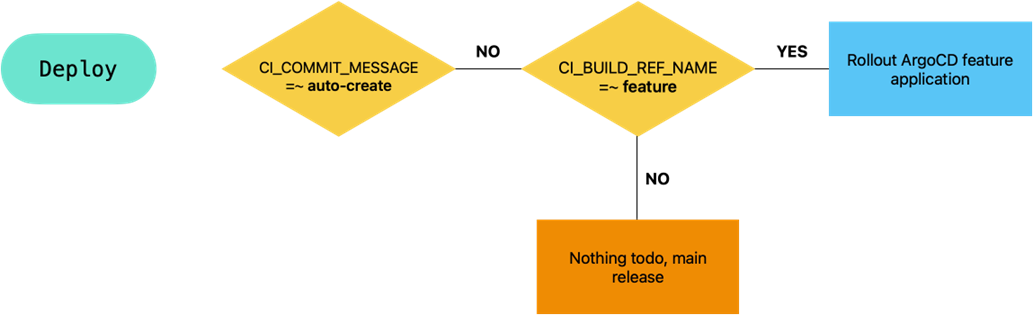
CD sequence
The CD pipeline is fairly simple; after a new branch is created, the argocd application is rolled out to the cluster, which then rolls out the new application once the image tag is set up.
In our example, we are using a Rancher Kubernetes cluster, which simplifies the authentication through the rancher cli tool.
- rancher login $RANCHER_URL --token "$RANCHER_TOKEN" --context "$RANCHER_CONTEXT"
    - cd argocd/feature
    - rancher kubectl apply -f demo-app-feature.yml
Deployment of the feature argocd application
kind: Application
metadata:
  name: feature-BRANCH_ID_TO_REPLACE
  namespace: argocd
  labels:
    env: BRANCH_ID_TO_REPLACE
  metadata:
  finalizers:
    - resources-finalizer.argocd.argoproj.io
spec:
  project: default
  source:
    repoURL: https://your.gitlabserver.ch/demos/auto-feature-branch-deploy.git
    targetRevision: feature/BRANCH_ID_TO_REPLACE
    path: kustomize/overlay/feature
  destination:
    server: https://kubernetes.default.svc
    namespace: feature-branch
  syncPolicy:
    syncOptions:
    automated:
      selfHeal: true
      prune: true
Argocd application definiton
All the BRANCH_ID_TO_REPLACE placeholders will get replaced at the creation of the new branch.
With the given syncPolicy, the argocd controller will check in regular intervals the checksum of the latest commit and will, if required, apply the changes to the environment.
Environments and cleanup
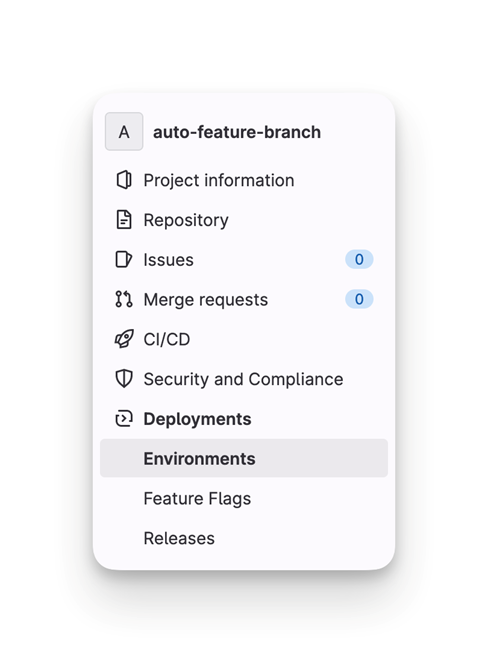
Environments overview on the GitLab server
With the help of GitLab CI/CD environments, the lifetime of a branch can be tracked through the states “available” or “stopped.”
If an environment stops for any reason (for example, through a merge or simply by deletion), GitLab allows you to perform a “stop_job” command. This is set by:
environment:
    name: $CI_BUILD_REF_NAME
    on_stop: feature_stop
For more information see Environments and deployments | GitLab
The stop_job in the CI branch deletes the twin branch in the CD repository. Because the repository is no longer available, this is accomplished by a push.
git push https://${GIT_USER}:${GIT_TOKEN}@${GIT_PROJECT_URL} +:refs/heads/feature/${FEATURE_PREFIX_LOW}
The argocd application will be deleted from the cluster in the CD branch’s stop_job. As we set the finalizer “resources-finalizer.argocd.argoproj.io”, it will delete all resources linked with it on the Kubernetes cluster.
Final words
All source code, build steps and pipelines are made within a “proof of concept“ mindset to demonstrate the possibility of an automated feature branch deployment. They are by fare not (yet) ready for production. But you should get the idea.
References
CI Repository https://gitlab.com/remmen/demos/auto-feature-branch
CD Repository https://gitlab.com/remmen/demos/auto-feature-branch-deploy
🔍 FAQ
1. What is an "Automated Rollout of a Git Feature-branch"?
It is a DevOps continuous integration and deployment (CI/CD) pattern where a completely isolated, temporary environment is dynamically spun up every time a developer creates a new feature branch in Git. Once the feature is tested and the branch is merged or deleted, the environment is automatically dismantled (cleaned up).
2. What problem does this approach solve?
Traditionally, development teams suffer from "environment bottlenecks," sharing a static number of staging environments (e.g., test-alpha, test-bravo). This leads to: Teams queueing or waiting to test their code. "Polluted" testing environments where code from different developers conflicts. Delayed feedback loops. By providing a dedicated environment for every feature branch, developers can validate their changes independently without impacting anyone else.
3. How does the automated cleanup (dismantling) work?
The setup relies on a two-way sync loop. When a developer completes a Pull Request (PR) and merges the feature branch into the main trunk, the branch is deleted. The GitOps controller (such as ArgoCD) detects that the branch no longer exists in the repository, triggers a deletion event, and automatically wipes out the corresponding Kubernetes namespace and resources to save infrastructure costs.